
Appearance
How Nebion Works
Nebion is a hosting platform that automates deployment of your web applications. Connect your Git repository, and Nebion creates isolated preview environments for every pull request — each with its own URL, containers, and configuration.
Webhook-Driven
Deployments trigger automatically from pull request events
Docker-Based
Your application runs in isolated containers on your own server
Configuration as Code
Define your setup in .nebion.yml — versioned alongside your code
Unique URLs
Every PR gets a live URL like pr-42.example.com
Architecture
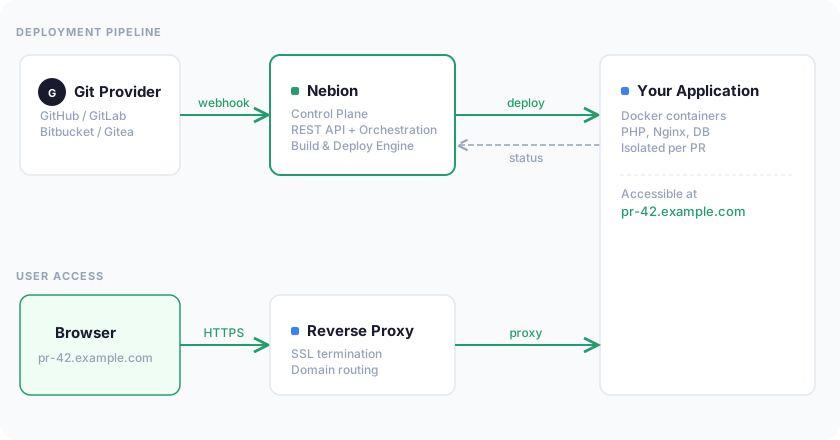
- Your Git provider sends a webhook to Nebion when a PR event occurs
- Nebion validates the webhook and triggers a deployment on the server
- Docker containers start on the deployment server
- Traefik routes traffic from the environment URL to the containers
- Deployment status is reported back to Nebion for display in the web interface
Pull Request Deployment Step by Step
Webhook Notification
Your Git provider sends a webhook to Nebion when a pull request event occurs (created, updated, merged, or declined). The webhook contains the PR number and source branch.
Validation
Nebion verifies the webhook signature to confirm it came from your Git provider. It identifies which project the webhook belongs to and determines the action (deploy or remove).
Code Checkout
Nebion clones your repository on the deployment server and checks out the PR branch. The code is placed in an isolated directory for this environment.
Configuration Reading
Nebion reads
.nebion.ymlfrom your repository root to determine which Docker Compose file defines your services, which service handles web traffic, and what deployment tasks to run.Environment Setup
Nebion creates a
.nebion.envfile with system variables (domain, PR number, branch) and your custom variables from the Nebion UI.Container Startup
Nebion generates a deployment-specific Docker Compose configuration and starts your containers. Each environment gets its own isolated set of containers.
Deployment Tasks
If defined in
.nebion.yml, pre-rollout tasks run before containers start (e.g., maintenance mode) and post-rollout tasks run after containers are up (e.g., install dependencies, clear caches).Routing
The reverse proxy (Traefik) routes traffic from your environment's URL to the correct container. Your application becomes accessible at
https://pr-{number}.{project-domain}.Cleanup (on PR close)
When the pull request is merged or declined, Nebion automatically stops containers, removes volumes and data, deletes the environment directory, and removes the routing configuration.
Manual Environments
Manual environments follow the same deployment process, but:
- Created through the Nebion web interface (not via webhooks)
- Use a custom domain you specify instead of the
pr-{number}pattern - Persist until you explicitly delete them
- Deployments are triggered manually using the Deploy button, or automatically on push if auto-deploy is enabled — unless the environment is protected, in which case it deploys only via the Deploy button
Useful for staging, QA, demo, or any long-lived deployment not tied to a pull request.
What Nebion Does Not Do
- Does not build your application — It runs your containers and deployment tasks. Building (e.g., compiling assets) happens inside your containers via deployment tasks.
- Does not manage DNS — You configure DNS records with your domain provider. Nebion configures routing once traffic reaches the server.
- Does not replace local development — It provides deployment environments. Continue using your local Docker setup for development.
- Does not provide a database — Your
docker-compose-nebion.ymlmust include a database service if your application needs one.