
Appearance
Environment Variables
Environment variables pass configuration to your containers without hardcoding values in your repository.
System Variables
Auto-injected by Nebion — domain, PR number, branch (read-only)
Custom Variables
Your key-value pairs — database URLs, API keys, feature flags
Per-Environment
Each environment can have different values for the same variable
Secure by Default
Stored encrypted, never committed to your repository
Managing Variables
Open your environment or project page and click the Variables tab. System variables are shown as read-only; custom variables are editable.
| Action | How |
|---|---|
| Add | Click Add new variable → enter Key and Value → Save |
| Edit | Change the value in the input field → Save |
| Remove | Click Remove next to the variable → Save |
Redeploy Required
After changing variables, click Deploy on the environment's Overview tab for changes to take effect.
Naming rules: Use uppercase with underscores (e.g., DATABASE_URL). Names starting with nebion_ are reserved. Names must be unique within the environment.
How Variables Reach Your Containers
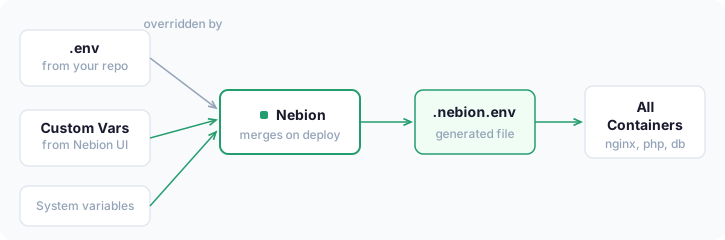
During each deployment, Nebion creates a .nebion.env file containing system variables and your custom variables, then starts your containers with it loaded. Every service in your docker-compose-nebion.yml has access to all variables automatically — no env_file entries needed.
System vs Infrastructure Variables
The system variables in your containers (NEBION_DOMAIN, NEBION_PR_NUMBER) are different from the infrastructure variables shown in the UI with the lowercase nebion_ prefix (nebion_domain, nebion_working_directory). Infrastructure variables drive the deployment process and are automatically excluded from your containers.
Variables in Your Containers
System Variables
| Variable | PR Env | Manual Env | Example |
|---|---|---|---|
NEBION_DOMAIN | Yes | Yes | example.com |
NEBION_ENV_IDENTIFIER | Yes | Yes | 42 (PR) / staging (manual) |
NEBION_ENV_BRANCH | Yes | Yes | feature/login |
NEBION_ENV_TYPE | Yes | Yes | pr / manual |
NEBION_PR_NUMBER | Yes | — | 42 |
NEBION_PR_BRANCH | Yes | — | feature/login |
Using System Variables
php
$domain = getenv('NEBION_DOMAIN');
$pr_number = getenv('NEBION_PR_NUMBER');
$env_type = getenv('NEBION_ENV_TYPE'); // "pr" or "manual"
php
// Set trusted host patterns based on Nebion domain
$nebion_domain = getenv('NEBION_DOMAIN');
if ($nebion_domain) {
    $settings['trusted_host_patterns'][] = '^.+\.' . preg_quote($nebion_domain) . '$';
}
bash
echo "Deployed to: $NEBION_DOMAIN"
echo "PR number: $NEBION_PR_NUMBER"
Common Custom Variables
DATABASE_URL=mysql://user:pass@db:3306/myapp
CACHE_BACKEND=redis
REDIS_HOST=redis
REDIS_PORT=6379
API_KEY=your-api-key
SMTP_HOST=mail.example.com
SMTP_PORT=587
DEBUG_MODE=false
Using Variables in Docker Compose
Your custom variables are available to all services automatically. You can reference them in docker-compose-nebion.yml using standard variable substitution:
yaml
services:
  php:
    image: php:8.3-fpm
    environment:
      - DATABASE_URL=${DATABASE_URL}
      - CACHE_BACKEND=${CACHE_BACKEND:-file}
The ${VARIABLE:-default} syntax provides a fallback value if the variable is not set.
In most cases, you do not need to list variables in the environment section. Since .nebion.env is loaded as an env_file, all variables are available to all containers automatically. Only use environment if you need to rename variables or provide defaults.
Variable Loading Order
.envfrom your repository (if present) is loaded first.nebion.env(generated by Nebion) is loaded second and overrides matching names
This lets you define development defaults in .env that Nebion overrides in deployed environments.
The .nebion.env File
The .nebion.env file contains system variables (NEBION_DOMAIN, NEBION_PR_NUMBER, etc.) and your custom variables. Infrastructure variables (nebion_* prefix) and registry credentials (REGISTRY_*) are excluded.
Example for a PR environment:
bash
# Added by Nebion
NEBION_DOMAIN=example.com
NEBION_PR_NUMBER=42
NEBION_PR_BRANCH=feature/my-feature

# Environment variables from Nebion
DATABASE_URL=mysql://user:pass@db:3306/myapp
CACHE_BACKEND=redis
API_KEY=your-api-key-here
Registry Credentials
If your project uses private Docker images, store registry credentials as custom variables using the REGISTRY_ prefix convention. These work together with the container-registries block in .nebion.yml.
For each registry declared in .nebion.yml, add matching credentials:
REGISTRY_GHCR_USERNAME=your-github-username
REGISTRY_GHCR_PASSWORD=ghp_your_personal_access_token
Registry credentials are excluded from .nebion.env and are never passed to your containers. See Container Registries for full configuration details.
Security
- Store sensitive values (passwords, API keys, tokens) as custom variables instead of committing them to your repository
- Rotate credentials periodically through the Variables tab
- Use per-environment values — different environments can have different variable values
- Only team members with environment access can view custom variable values
Troubleshooting
Variables not available in containers
- Verify the variable appears in the Custom Variables section on the Variables tab
- Make sure you redeployed the environment after adding or changing variables
- Check that the variable name does not start with
nebion_(reserved prefix) - Check deployment logs (click View Output) for errors during variable injection
Variable value not updating
- After editing a variable, you must redeploy the environment
- If the value still does not update, try deploying with Reset environment checked
Cannot create variable with 'nebion_' prefix
- The
nebion_prefix is reserved for system variables — choose a different name (e.g.,MY_APP_SETTING)
.env file not loading
- Nebion looks for
.envin your repository root — verify it is committed to the branch you are deploying - Variables in
.nebion.envoverride same-named variables in.env